
갤러리 위젯의 타이틀 영영의 역동적인 느낌을 주고 싶을때 모션을 적용하는 방법입니다.
예시 영상
https://youtu.be/xzoYYJBz3zc?si=PqWsPuV38Ry2w0-J
갤러리 위젯설정
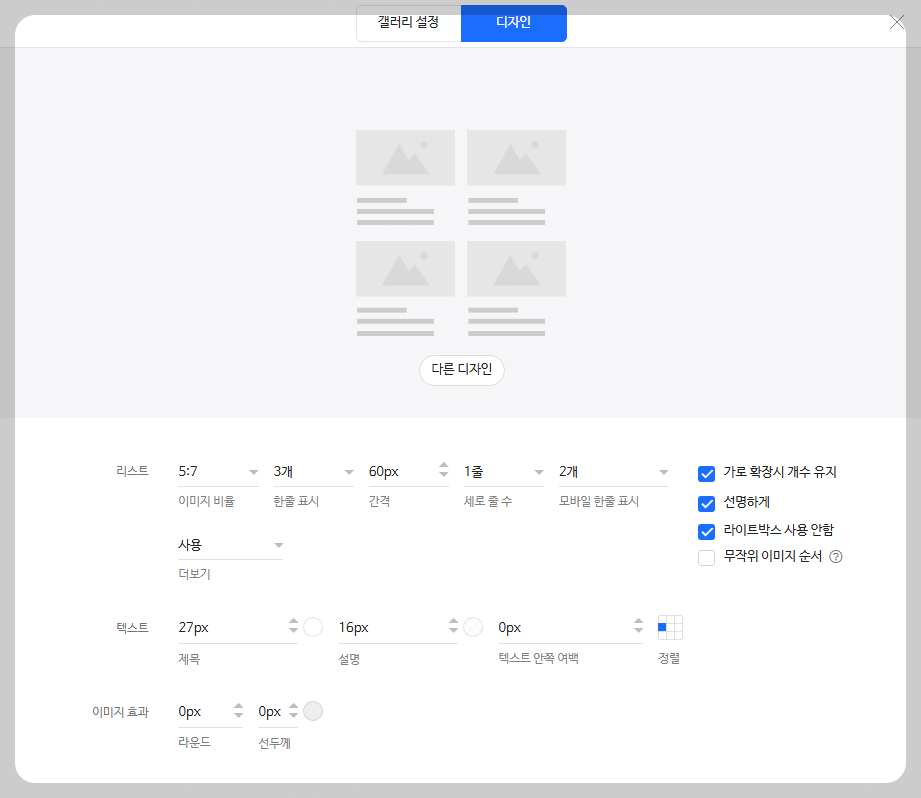
코드 위젯에 css기입
#s20250226fa2878fb5ba15 숫자들은 섹션의 아이디값입니다. [아임웹 가이드 '섹션 ID 확인하기' 바로가기]
<style>
  /* 데스크톱 (해상도 1024px ~ 1279px)*/
@media all and (min-width:1080px) and (max-width:2560px) {

#s20250226fa2878fb5ba15 .item_container  {position: relative;  text-decoration: 0;  display: block;  text-align: center; }
#s20250226fa2878fb5ba15 .itext_wrap {  position: absolute;  bottom: 0;  left: 0;  right: 0;  overflow: hidden; }
#s20250226fa2878fb5ba15 .item_gallary .text_wrap .title  {  position: absolute;  right: 0;  left: 0;  bottom: 0; background: #0b2e76; padding: 30px; height: 40%; transition: .4s;}
#s20250226fa2878fb5ba15 .item_gallary .text_wrap .title:hover {  height: 60% !important; }

}


/* 노트북 & 테블릿 가로 (해상도 1024px ~ 1279px)*/
@media all and (min-width:1024px) and (max-width:1279px) {

#s20250226fa2878fb5ba15 .item_container  {position: relative;  text-decoration: 0;  display: block;  text-align: center; }
#s20250226fa2878fb5ba15 .itext_wrap {  position: absolute;  bottom: 0;  left: 0;  right: 0;  overflow: hidden; }
#s20250226fa2878fb5ba15 .item_gallary .text_wrap .title  {  position: absolute;  right: 0;  left: 0;  bottom: 0; background: #0b2e76; padding: 30px; height: 40%; transition: .4s;}
#s20250226fa2878fb5ba15 .item_gallary .text_wrap .title:hover {  height: 60% !important; }
}

/* 테블릿 가로 (해상도 768px ~ 1023px)*/
@media all and (min-width:768px) and (max-width:1023px) {

#s20250226fa2878fb5ba15 .item_container  {position: relative;  text-decoration: 0;  display: block;  text-align: center; }
#s20250226fa2878fb5ba15 .itext_wrap {  position: absolute;  bottom: 0;  left: 0;  right: 0;  overflow: hidden; }
#s20250226fa2878fb5ba15 .item_gallary .text_wrap .title  {  position: absolute;  right: 0;  left: 0;  bottom: 0; background: #0b2e76; padding: 30px; height: 40%; transition: .4s;}
#s20250226fa2878fb5ba15 .item_gallary .text_wrap .title:hover {  height: 60% !important; }

}

</style>
코드 복사하셔서 섹션 아이디값 입력하고
디바이스별로 원하시는대로 CSS다르게 조정하면됩니다.
Mobile 버전도 추후 포스팅 할예정입니다.
여유있게 기다려주세요 :)

LIST
'아임웹 코드' 카테고리의 다른 글
| 아임웹 텍스트 위젯에 hover 테두리 css (0) | 2024.11.14 |
|---|---|
| 아임웹 위젯 애니메이션이 안될때 (0) | 2024.07.16 |

